EraSmart A2 ROGB DTF Printe
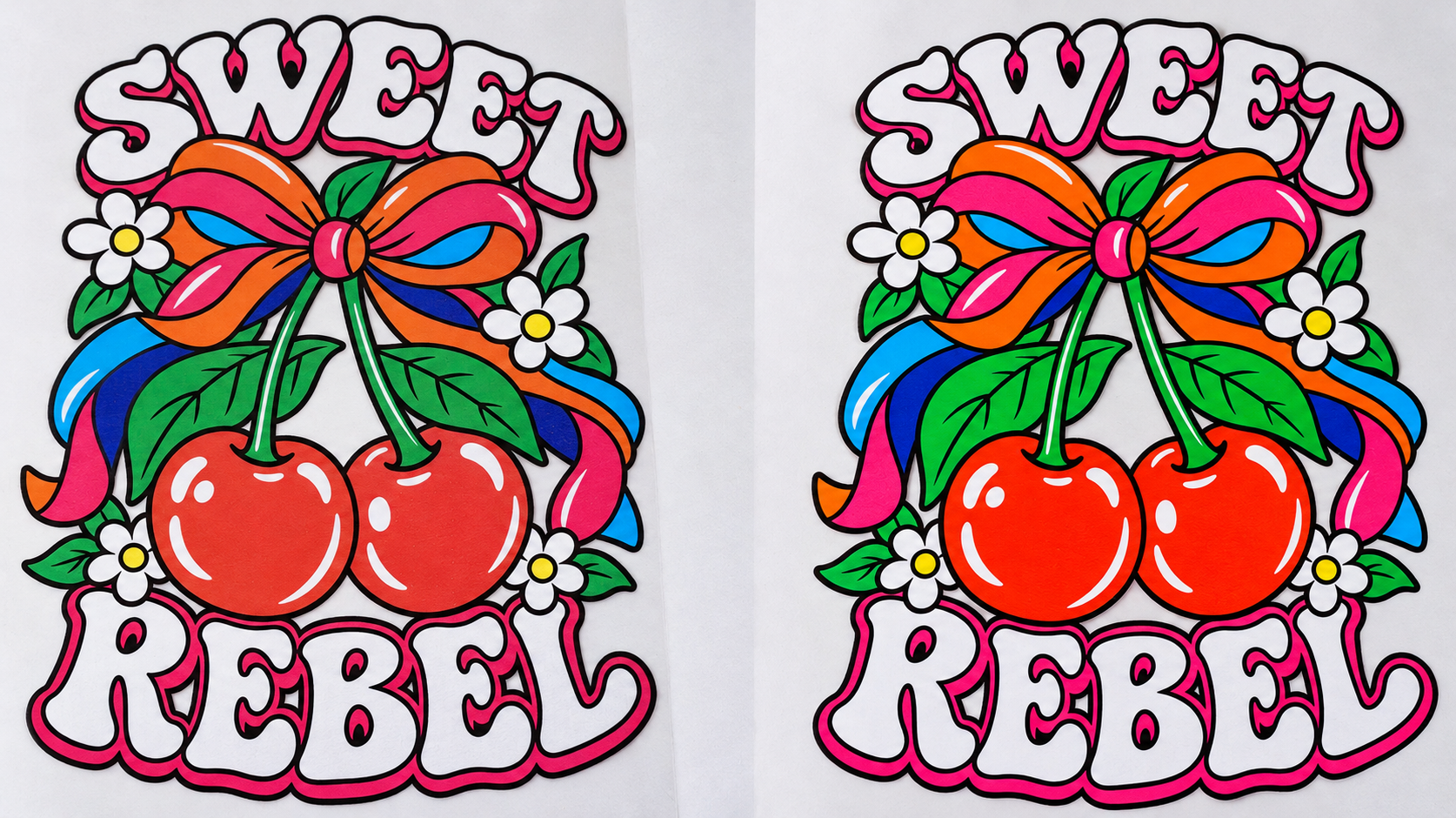
EraSmart A2 ROGB DTF Printer for Branded Apparel and Designer Graphics
The EraSmart A2 ROGB DTF Printer combines CMYK with dedicated red, orange, green, and royal blue inks, plus a separate white ink system. Built for apparel printing service providers, customization studios, and clothing brands, it offers an eight-color configuration for designs where color plays a central role.
Dedicated RIIN software automatically distributes artwork colors across the CMYK + ROGB ink set. Users can import ordinary artwork without manually identifying ROGB areas or preparing separate spot-color regions.
With I3200(8)-A1HD and I1600-A1 printheads, a maximum printing width of 450 mm, and support for roll and sheet PET film, the A2 brings this multicolor configuration into a garment-transfer workflow.
Eight color inks: cyan, magenta, yellow, black, red, orange, green, and royal blue.
Four white ink channels supplied by one white ink bottle.
Automatic CMYK + ROGB color separation through dedicated RIIN software.
Nine 250 ml ink bottles, providing 2.25 L of total capacity.
Touchscreen controls, scheduled automatic cleaning, and timed white ink circulation.
How CMYK + ROGB Changes Color Reproduction
A conventional CMYK DTF system reproduces color graphics with cyan, magenta, yellow, and black inks, supported by white ink. The A2 ROGB adds four dedicated color inks to that foundation.
These additional inks give the printing system more color resources for reproducing artwork. Their value is best understood through two types of designs: everyday artwork where color reproduction matters, and graphics with prominent red, orange, green, and royal blue areas.
Photographs, illustrations, and everyday apparel graphics do not need obvious ROGB color blocks to be considered for eight-color printing. RIIN software processes the complete artwork and automatically distributes its colors across the available ink set.
For these designs, the comparison centers on how closely the finished transfer follows the intended appearance. Relevant details include the relationships between neighboring colors, the overall color balance, and specific areas that matter to the customer.
The practical question is whether the eight-color result brings a particular design closer to its approved reference. A physical target sample provides a useful basis for that comparison.
Artwork with prominent red, orange, green, or royal blue areas provides a direct way to examine the contribution of the additional inks.
Examples include a red brand mark, orange lettering, green decorative elements, or royal blue sections in a team graphic. In these designs, the comparison can focus on the vividness and saturation of the key colors, along with their appearance within the complete composition.
The ROGB configuration provides the potential for stronger color expression in relevant artwork. The visible difference depends on the design and the complete printing and transfer setup.
In this comparison, “four-color” and “eight-color” refer to the color inks. White ink is separate in both configurations.
Comparison Point CMYK + White DTF CMYK + ROGB + White DTF Color ink set Cyan, magenta, yellow, and black CMYK plus red, orange, green, and royal blue Reproduction of ROGB colors Uses combinations of the CMYK inks Adds dedicated ROGB inks to the available color separation Everyday artwork Suitable for many standard apparel graphics Provides another configuration to compare against the intended colors Prominent ROGB areas Appearance depends on the colors achievable with the CMYK ink system Additional inks may improve the vividness or reproduction of relevant colors Artwork preparation on this A2 model Not applicable to the ROGB configuration RIIN automatically assigns colors without manual ROGB region selection Best basis for selection Actual artwork, target colors, and finished transfers The same artwork compared through finished transfer samples
More color inks do not automatically mean higher printing resolution or an equally visible improvement in every design. Actual results depend on the artwork, inks, color settings, white underbase, fabric, and transfer conditions.
Automatic Color Separation for Everyday Artwork
The dedicated RIIN software supports the A2’s CMYK + ROGB configuration through automatic color recognition and separation.
Users import ordinary artwork, and the software determines its distribution across the eight color inks. This connects the expanded ink configuration to a practical preparation workflow.
Users do not need to draw selection areas around red, orange, green, or blue elements. They also do not need to prepare separate ROGB spot-color regions before importing the artwork.
This removes a manual preparation step when working with customer-supplied designs, including illustrations, logos, lettering, and mixed-color graphics.
One Workflow for Different Types of Artwork
The same automatic color-distribution function handles both everyday graphics and designs with prominent ROGB areas.
The printer supports TIFF, JPEG, JPG, PNG, and PDF files. Artwork preparation should still account for the intended print dimensions and image quality. Automatic color separation handles ink distribution; it does not replace the need for suitable print settings or sample approval.
Eight Color Channels and Four White Channels
The A2 uses two printheads with separate color and white ink responsibilities. Understanding this arrangement explains why the printer has eight color inks, nine ink bottles, and twelve ink channels.
The I3200(8)-A1HD printhead provides eight channels. Each channel corresponds to one color: C, M, Y, K, R, O, G, or B.
This arrangement gives the CMYK + ROGB ink set a dedicated channel for every color.
The I1600-A1 printhead provides four white ink channels. All four receive white ink from a single white ink bottle.
The notation WWWW describes those four channels. It does not indicate four white ink bottles or four different white inks.
Ink System Printhead Channel Assignment Ink Bottles Color I3200(8)-A1HD C, M, Y, K, R, O, G, B Eight bottles, 250 ml each White I1600-A1 W, W, W, W One bottle, 250 ml Total Two printheads Twelve channels Nine bottles, 2.25 L total capacity
Applications for Branded and Personalized Apparel
The A2 ROGB configuration is relevant to garment graphics where particular colors contribute to the identity or appearance of the finished product.
Brand marks often contain a small number of highly recognizable colors. A particular red, orange, green, or blue may be central to the design.
For these projects, compare the printed logo with the customer’s target reference on the intended garment. The additional ROGB inks provide another configuration to assess when a standard CMYK result does not meet the desired appearance.
Illustrated Apparel and Designer Graphics
Illustrations can combine large color areas, fine details, and transitions between neighboring shades.
The eight-color configuration can be evaluated using complete artwork, with attention to both vivid areas and the relationships between colors. This is useful for illustrated T-shirts, compatible sweatshirts, and coordinated apparel collections.
Team logos, names, numbers, and event graphics often depend on clear color identities.
The A2 supports transfer development for these designs, including compatible textile accessories such as canvas bags. Fabric heat tolerance, adhesion, and finished transfer performance should be checked for each material and consumable combination.
The printer produces graphics on PET film. Garments and other compatible textiles receive the design through the subsequent heat-transfer process.
Daily Operation and the DTF Transfer Workflow
A 450 mm Printing Width with Roll and Sheet Film Support
The maximum printing width is 450 mm. This provides a defined area for arranging chest logos, lettering, garment graphics, and mixed transfer layouts.
Both roll and sheet PET film are supported. Layout planning should use the actual artwork dimensions and required spacing within the printable area.
Touchscreen Controls and Maintenance Support
The touchscreen control system provides an interface for printer operation. Media suction supports film handling, while scheduled automatic cleaning and timed white ink circulation assist routine equipment care.
These functions support maintenance procedures. Operators should continue to follow the supplied guidance for nozzle checks, cleaning, and white ink management.
Printing Mode Resolution 4 pass 720 × 1200 dpi 6 pass 720 × 1800 dpi 8 pass 720 × 2400 dpi
The listed printing speed is 1.5–2 m²/h at 8 pass . This describes the printing stage. Order planning also needs to allow time for powder application, curing, heat pressing, and handling.
Import the artwork into the dedicated RIIN software.
Allow the software to complete CMYK + ROGB color separation, then apply the appropriate printing settings.
Print the design onto compatible PET film.
Apply adhesive powder and cure the transfer according to the consumables’ instructions.
Heat-press the transfer onto the selected garment.
Follow the film’s peeling instructions and inspect the finished result.
Compatible powder application, curing, and heat-press equipment are required to complete the workflow. Package contents should be established in the equipment quotation.
Technical Specifications and Ink Configuration Selection
Item Specification Product Name EraSmart A2 ROGB DTF Printer Model A2 Color Printhead I3200(8)-A1HD White Printhead I1600-A1 Number of Printheads 2 Color Channels 8: C, M, Y, K, R, O, G, B White Channels 4: W, W, W, W Complete Ink-Channel Configuration CMYK + ROGB + WWWW Ink Type Non-fluorescent DTF color inks and white ink Ink Bottles 9: eight color bottles and one white bottle Capacity per Bottle 250 ml Total Ink Bottle Capacity 2,250 ml / 2.25 L Maximum Printing Width 450 mm 4 Pass Resolution 720 × 1200 dpi 6 Pass Resolution 720 × 1800 dpi 8 Pass Resolution 720 × 2400 dpi Printing Speed 1.5–2 m²/h at 8 pass Printing Media Roll and sheet PET film Software Dedicated RIIN software with automatic CMYK + ROGB color separation Control System Touchscreen Motherboard Hoson Interface Gigabit Ethernet Media Suction Supported Printhead Cleaning Scheduled automatic cleaning White Ink Circulation Timed white ink circulation Operating System Windows 7/8/10/11 Supported File Formats TIFF, JPEG, JPG, PNG, PDF Operating Temperature 15–30°C Relative Humidity 40–60% Voltage 220V/110V Rated Power 250 W Equipment Dimensions 825 × 650 × 400 mm Equipment Weight 30 kg
The A2 ROGB and A2 Fluorescent models share the listed hardware and operating specifications. Their principal difference is the additional color ink set.
Selection Point A2 ROGB DTF Printer A2 Fluorescent DTF Printer Color Ink Configuration CMYK + ROGB CMYK + FY FM FG FO Additional Color Inks Non-fluorescent red, orange, green, and royal blue Fluorescent yellow, magenta, green, and orange White Ink Configuration Four channels supplied by one white ink bottle Four channels supplied by one white ink bottle Ink Bottle Capacity Nine bottles × 250 ml Nine bottles × 250 ml Maximum Printing Width 450 mm 450 mm Printing Speed 1.5–2 m²/h at 8 pass 1.5–2 m²/h at 8 pass Controls Touchscreen Touchscreen Main Selection Consideration Non-fluorescent artwork and the contribution of additional ROGB inks Artwork requiring fluorescent ink effects
Select the ink configuration according to the intended print appearance and approved samples. Shared hardware specifications do not establish that the two ink configurations can be exchanged through a simple ink replacement.
A complete setup also requires suitable DTF film, adhesive powder, curing equipment, and a heat press. A compatible powder shaker and dryer may be considered where appropriate for the production workflow.
Consumables and supporting equipment should be selected for the printer configuration, film format, and intended fabrics.
Do I Need to Manually Assign Red, Orange, Green, and Blue Areas?
No. The dedicated RIIN software automatically recognizes and distributes artwork colors across the CMYK + ROGB ink set. Users do not need to mark ROGB regions or prepare separate ROGB spot-color areas.
Will Eight-Color Printing Make Every Design Look More Vivid?
The difference varies by design. Artwork with prominent colors that benefit from the additional inks may show a more noticeable change. Designs already reproduced well by a CMYK system may show a smaller difference.
Use the actual customer artwork to compare the finished transfers.
Does the Printer Guarantee an Exact Brand-Color Match?
An exact match cannot be guaranteed from the ink configuration alone. Provide a physical color reference where possible, then assess the transfer on the intended fabric.
The inks, color settings, white underbase, and transfer conditions all contribute to the final appearance.
Can the Same Artwork Be Compared on Four-Color and Eight-Color Systems?
Yes. EraSmart can provide actual four-color and eight-color transfer samples using the same artwork.
Comparisons should use consistent fabric, transfer conditions, and viewing light where practical, with suitable settings for each printing system. This makes the results more relevant to the intended garment application.
Can I Supply My Own Artwork for Sampling?
Yes. Customer-supplied artwork is accepted for sampling. Include the intended print dimensions, fabric requirements, and any colors that need particular attention.
Sampling fees and arrangements are agreed according to the project.
Can I Switch Between ROGB and Fluorescent Inks by Refilling the Bottles?
Do not assume that replacing the inks is sufficient. Although the two models share their listed hardware configuration, any conversion requires guidance on ink compatibility, cleaning, and software settings.
Discuss the intended change with EraSmart before introducing a different ink set.
Does the Printer Include Powder Application, Curing, and Heat-Press Equipment?
Included equipment depends on the quoted package. The printer is one stage of the DTF process; powder application, curing, and heat pressing require suitable supporting equipment.
What Information Is Useful for a Transfer Sample Comparison?
Provide the artwork, final print size, intended fabric, and a target color reference when available. Identify whether the main priority is overall color reproduction, specific brand colors, or vivid ROGB areas.
EraSmart can use these requirements to arrange a same-artwork four-color and eight-color transfer comparison. Sampling charges and project details are agreed before proceeding.